Check it before you tap it.

Arqivon Guardian reads a link, message, screenshot, QR code, invoice or file and tells you whether it looks like a scam, why, and what it could not verify.

It never opens a link for you, and it is not a scanner for your device.

Check somethinglink ยท example

secure-parcel-redelivery.example/pay

→ compared the sender with the courier it names

→ found a request for a card to release a parcel

→ link text and destination differ

→ could not verify who runs the site

Danger

Don't tap it.

Hand it anything suspicious.

You don't have to know what kind of scam it is. Paste it, share it or photograph it, and Guardian works out what it is looking at.

  • LinksWhere it really goes, who sent it, and whether the text matches the destination.
  • MessagesTexts and emails that rush you, impersonate a bank or a courier, or ask for a code.
  • ScreenshotsA picture of a chat or a page. It reads the text in the image, then checks it like a message.
  • QR codesWhere a code leads, before you go there. Rolling out
  • InvoicesNew bank details on a familiar supplier, mismatched names, and pressure to pay today.
  • FilesDocuments and attachments with risky content, checked without you opening them.

Three verdicts, never a shrug.

Every result is a word first: Safe, Caution or Danger. Underneath is the reason, and the list of things Guardian could not check. A miss is never treated as a Safe.

Danger

This looks like a fake DHL payment page.

The message you sent it“Your parcel is held. Pay a £1.99 fee to release it today.”

secure-parcel-redelivery.example/pay

  • The sender domain does not belong to the courier.
  • It asks for card details to release a parcel.
  • The link text and the real destination differ.
Could not verifyWho operates the site.

What to do: don't tap it, and don't enter a card. Go to the courier's own app or site.
Caution

The invoice asks you to change bank details.

A new account on a familiar invoice is a common fraud. Confirm by phoning the supplier on a number you already have.

Could not verifyThat the new account belongs to the supplier.
Safe

This link goes to a well-known site.

No sign of impersonation or a mismatched destination in what Guardian could check.

Could not verifyNothing it needed. If it ever can't check something, it says so here.

Inbox Shield, only when you ask.

Inbox Shield checks the mail you have already connected and marks what looks risky. It runs when you ask, not in the background, and any action it suggests waits for your tap.

  • Reads connected mail only when you start a scan.
  • Shows the same Safe, Caution or Danger verdicts.
  • Suggested actions wait for your approval.
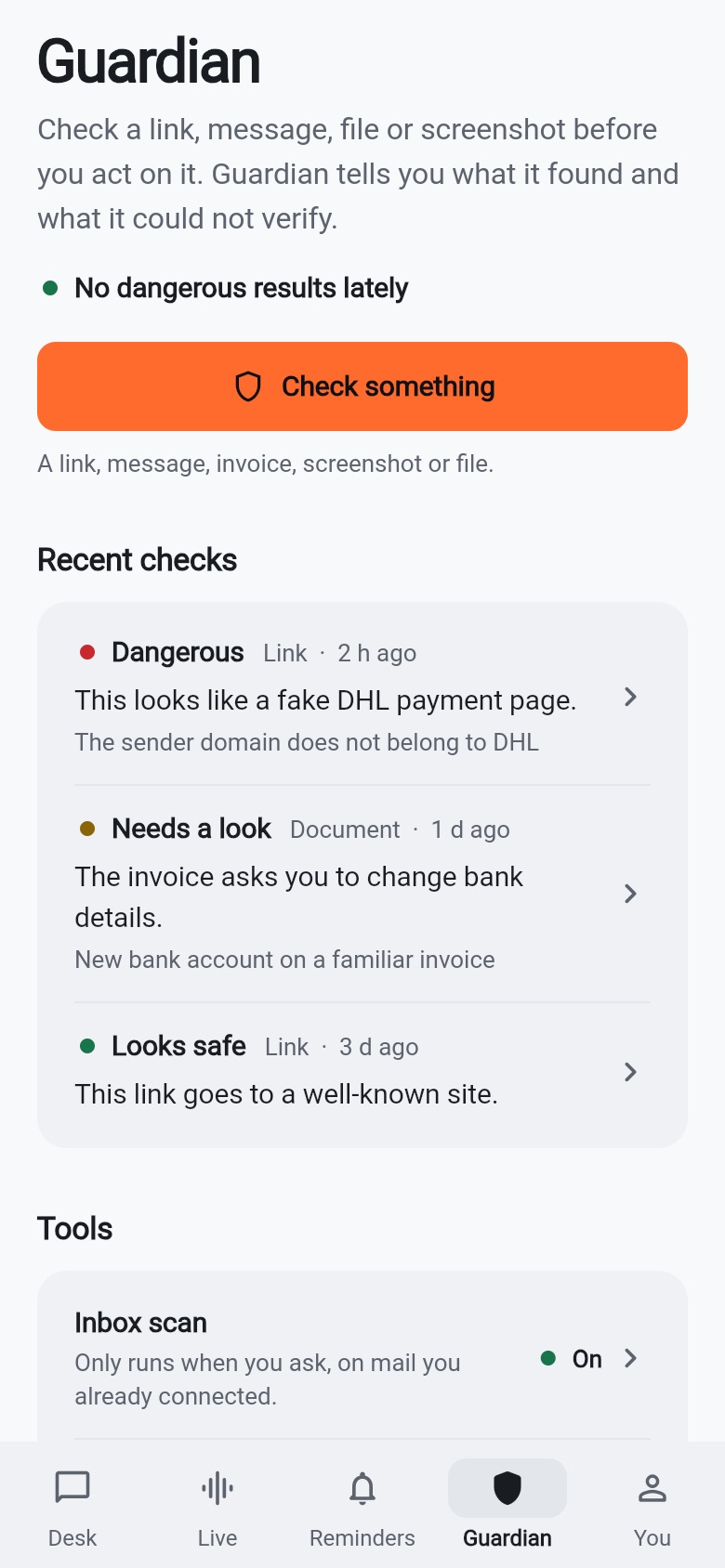
The Guardian screen in the Arqivon app: a Check something button and recent checks marked Dangerous for a fake DHL payment page, Needs a look for an invoice that changes bank details, and Looks safe for a well-known link.

The Guardian tab, with Inbox scan under Tools.

What Guardian will never do.

A safety tool that overreaches is its own risk. These limits are part of how it works.

Never opens a link for you.

You decide whether to go there. Guardian tells you what it found first.

Never calls a gap Safe.

If it couldn't check something, the result says so. Safe only appears when nothing was left unverified.

Never acts without your tap.

Deleting, forwarding or replying always waits for you to approve.

Never scans your device.

It looks at what you hand it. It is a desk for checking, not a device antivirus.

Check something now.

Guardian is part of Arqivon. Open the app, tap Check something, and hand it the message you're not sure about.